Configuring your privacy policy
Introduction
When you use the WorkAdventure dashboard, WorkAdventure will store on your behalf some personal data about your members.
If you have allowed self-registration, WorkAdventure will also store personal data about your visitors.
This data can be used to identify them, like their email address, or their name.
In the terms of the GDPR, you are the data controller for your world: you decide who can register, what their personal data is used for, and why. WorkAdventure is your data processor for everything it does on your instructions - hosting the world, storing the accounts, running the chat server, relaying video streams.
For a narrow set of platform-wide activities that are our own decision rather than yours - security, abuse prevention, infrastructure monitoring and platform analytics - WorkAdventure acts as an independent data controller. The generated privacy policy states all three roles, so your users know who to address for what.
To comply with the GDPR, you need to inform your users about the data you collect and the purposes of processing.
WorkAdventure provides a world-level privacy policy that is generated from your configuration. It is displayed to users when they register as visitors and is accessible at any time from a dedicated URL for your world.
How the generated privacy policy works
When you use the WorkAdventure-generated privacy policy (the default option), WorkAdventure builds a notice that is contextualized to your world. It includes:
- your organization name as data controller
- the name of your world and the features enabled in it (visitors, chat, bots, Discord bridge, usage analytics, etc.)
- the purposes you selected for using personal data
- information about WorkAdventure as data processor, including platform processing (security, analytics, moderation)
- whether usage analytics (product/usage metrics sent to the Admin analytics pipeline) is enabled for your world, and how those events are pseudonymized (see Analytics)
- recipients and sub-processors relevant to your configuration (e.g. LiveKit, Discord bridge, Cloudflare TURN, email delivery)
- international transfers where applicable, and safeguards such as Standard Contractual Clauses
- user rights under the GDPR and contact details
- an Additional Information for United States Residents section, covering the categories of data collected, their sources, the recipients, the retention periods and the rights that California (CCPA/CPRA), Virginia, Colorado, Connecticut and other US states grant their residents
The policy is updated automatically when you save your settings.
The Last Updated date shown at the top of the policy is the most recent of two dates: the last time you saved your personal data usage configuration (toggling usage analytics for the world counts as such a save), and the last time WorkAdventure updated the policy template itself. The document has two authors, so a change by either one moves the date.
Worlds on the free plan
Every world gets the generated privacy policy, on every plan - your users always have a notice to read. Choosing the purposes is what requires a premium subscription.
A world that has never configured its purposes - every free world, and any premium world where nobody opened the configuration page yet - publishes the same policy, with one difference: instead of a list of purposes, it states that no purpose beyond running the world has been declared. That is an accurate statement, and it is the one you want on record until you decide otherwise.
Contact address for privacy requests
Your privacy policy names your organization as the data controller and prints an email address as the way your users exercise their rights (access, correction, deletion). Set it in the Contact email for privacy requests field at the top of the page.
This field is editable on every plan, premium or not. The page shows the address currently published, so you can check what your users actually see. If you leave the field empty, the account owner's email address is used.
Preview your privacy policy
From the Privacy / Compliance page, click View current privacy policy to open the generated notice for your world.
Configuring your privacy policy
To configure your privacy policy, go to the Privacy / Compliance page accessible from the Settings section of the left sidebar in the administration dashboard.
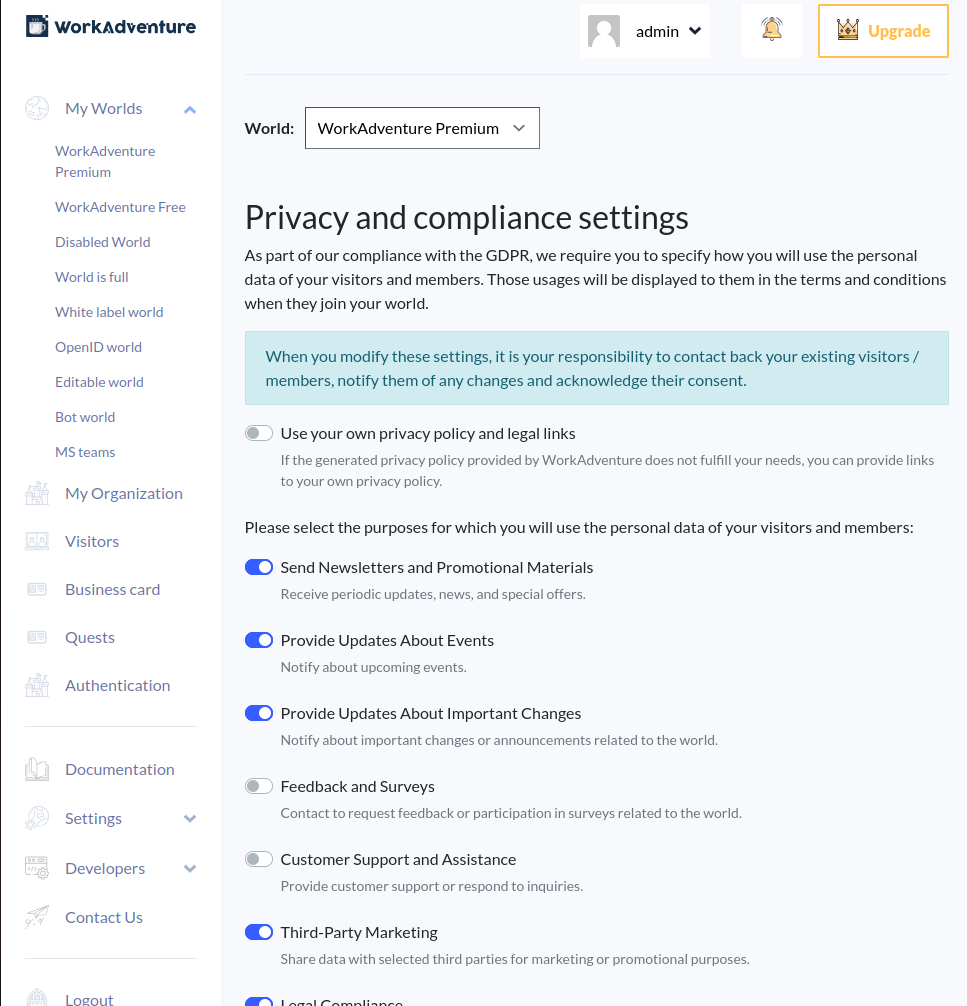
This page allows you to list all the possible uses of the data you collect through a number of checkboxes.
If your use case is not listed, you can add a custom use case in the text area at the bottom of the page.
When you are done, click on the Save personal data usage settings button.
Configuring a custom privacy policy
If the privacy policy settings provided by WorkAdventure are not enough for your use case, you can instead point your users to your own legal documents. To do so, click the Use your own privacy policy and legal links checkbox.
You will then be able to provide a link to your own privacy policy. In addition, you can provide a link to your terms of service and to your cookie policy.
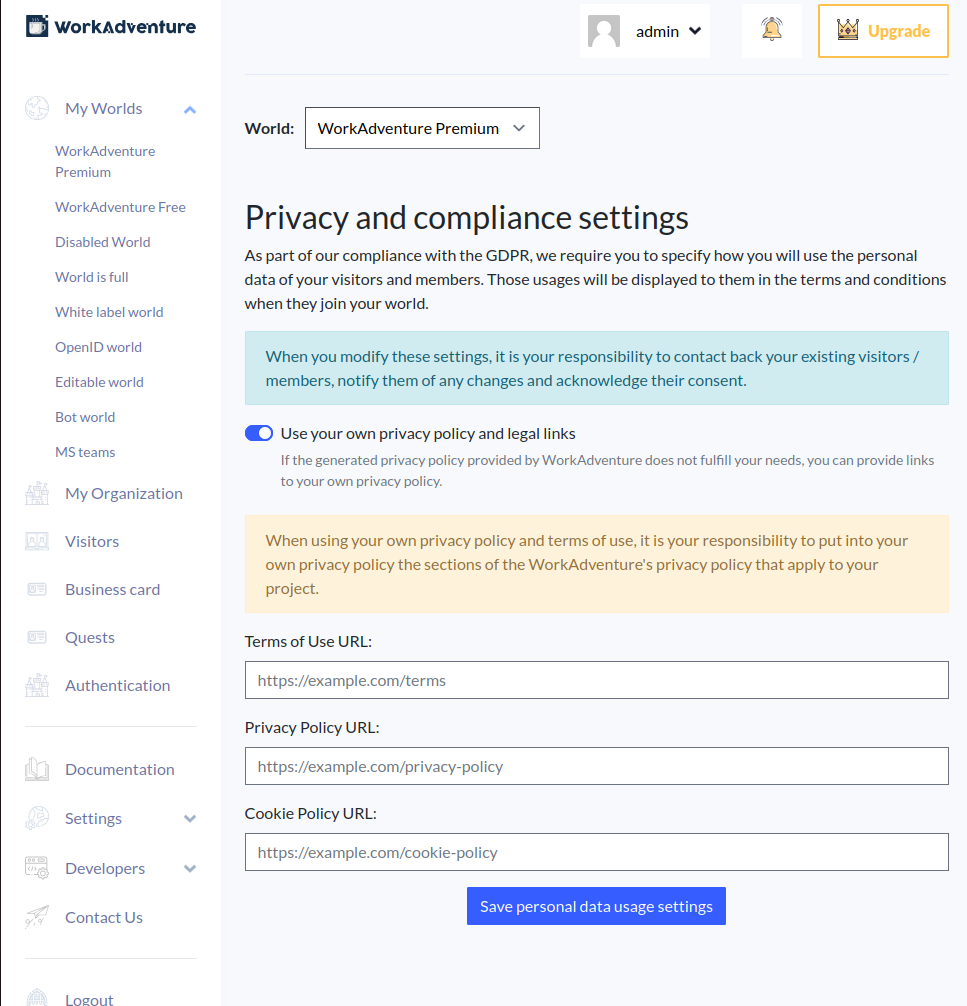
WorkAdventure is still responsible for the data it processes on your behalf. You must ensure that your privacy policy is compliant with the GDPR and that it covers the data processed by WorkAdventure. In particular, your policy should include:
- the purposes and legal bases for each processing activity
- explicit retention periods or criteria
- recipients, sub-processors, and third-party integrations enabled in your world (Matrix, video conferencing, Discord bridge, bots, analytics, etc.)
- the data you forward to your own systems through webhook endpoints (recordings, analytics events), and what you do with it
- information about international transfers, if applicable
- user rights and contact details
Please incorporate the sections of the WorkAdventure-generated privacy policy that apply to your project, especially platform processing performed by WorkAdventure as data processor.
A word on Third-Party Marketing
One checkbox on that page deserves a closer look before you tick it: Third-Party Marketing.
In the European Union, sharing personal data with third parties for marketing generally requires each user's explicit, freely given consent. WorkAdventure asks for this one on its own - it is never bundled with your organization's other emails - records the answer, and lets users withdraw it at any time from their in-game privacy settings. You can see where each person stands in the visitors list, and export it.
Consent is only valid if it is specific, so ticking the box asks you a second question: who do you share this data with? Name them - "selected third parties" is not consent to anything in particular. The names you give are printed in your privacy policy and on the consent checkbox itself, so the person ticking it reads them. You cannot save the purpose without them.
If you later change that list, WorkAdventure tells you how many people already answered about the previous partners. Their consent does not extend to a new recipient, and asking them again is your call: nothing is cleared automatically, because an admin correcting a typo should not lose real answers. You can reset any individual to "Not asked" from the member edit screen to have them asked again at their next connection.
One thing stays entirely yours: a withdrawal stops at WorkAdventure. Data you have already exported and shared stays with the recipient until you tell them to delete it.
In the United States, the same sharing may amount to a "sale" or a "share" under California law, and to "targeted advertising" under other state laws, which give residents a right to opt out. WorkAdventure provides no opt-out mechanism and does not honour Global Privacy Control signals: an opt-out request reaches you by email, and acting on it is your responsibility.
WorkAdventure collects the consent and names your partners in the policy; it cannot reach them for you. If you tick this box, mirror every withdrawal to your partners and handle US opt-out requests yourself.
Updating your privacy policy
When you modify your personal data usage settings, it is your responsibility to:
- notify existing visitors and members of any material changes
- obtain renewed consent where required (e.g. if you add a new purpose based on consent, such as marketing)
For the second one, WorkAdventure does most of the work: a consent-based purpose nobody has answered yet is put to each user at their next connection, so a purpose you add today is asked for as people come back rather than immediately.
The Last Updated date on the generated policy is refreshed each time you save your settings - and also when WorkAdventure updates the policy template, for instance to describe a new platform feature.
If you change your privacy policy (for instance if you decide to use visitors data for a new purpose), only visitors who have been informed of and, where required, consented to the new purpose can be targeted for that purpose. You do not have to work out who those are from their registration date: the visitors list has a column per consent question, showing Granted, Denied or Not asked for each person.
How consent is collected
Purposes marked Your consent on the settings page are the only ones that ask the user anything. Every other basis - legitimate interest, contract, legal obligation - is disclosed in the policy and nothing more.
For those that do ask:
- At registration. The checkboxes appear on the signup form, unticked, and are never pre-ticked or bundled with accepting the terms.
- At the next connection, for anyone who registered before you declared the purpose, or who has never been asked for another reason.
- Never for a purpose you have not declared, and never again once someone has answered - including when they answered no.
Your organization's own email purposes share a single checkbox, because they share a controller, a channel and a nature. Third-party sharing always gets its own, and so does a custom purpose you wrote yourself. Each still gets its own record, so the log stays keyed by real purposes.
Users change their mind from inside the world: the in-game menu has a Privacy choices entry listing everything they have been asked, with what they answered. Withdrawal takes effect immediately.
You can also record consent you collected elsewhere - on paper, in your own signup form - when you invite or edit a member, or through the Consent: columns of the member import. Those records are marked as your assertion rather than the user's own click.
SSO and organization members
If your world uses a corporate identity provider, tick Users signing in through this provider are members of my organization on its configuration screen. Consent to receive your organization's emails will then not be asked: you rely on your working relationship with those people instead, which is the correct basis for an employer - consent given to an employer is rarely considered freely given.
This suppresses that one question only. Third-party sharing is not covered by a working relationship and is still asked for, and everyone keeps the right to object to direct marketing at any time from their Privacy choices.
See also Access the visitors list for related obligations when exporting visitor data.